Virtualisation (KVM host)
Running guest operating systems is a first-class use of WebGen, not an add-on. The kernel includes KVM host support; QEMU runs the guests with near-native speed. iproute2 creates bridge and tap devices so guests get real network access.
For GPU/PCI passthrough the kernel ships VFIO with the IOMMU built in — add intel_iommu=on (or amd_iommu=on) to the kernel command line to arm it, then bind a device to vfio-pci.
The intended lifecycle: boot the live ISO → install to disk → use that install as a master system that runs your daily-driver OSes as guests.
The Virtual Machines window
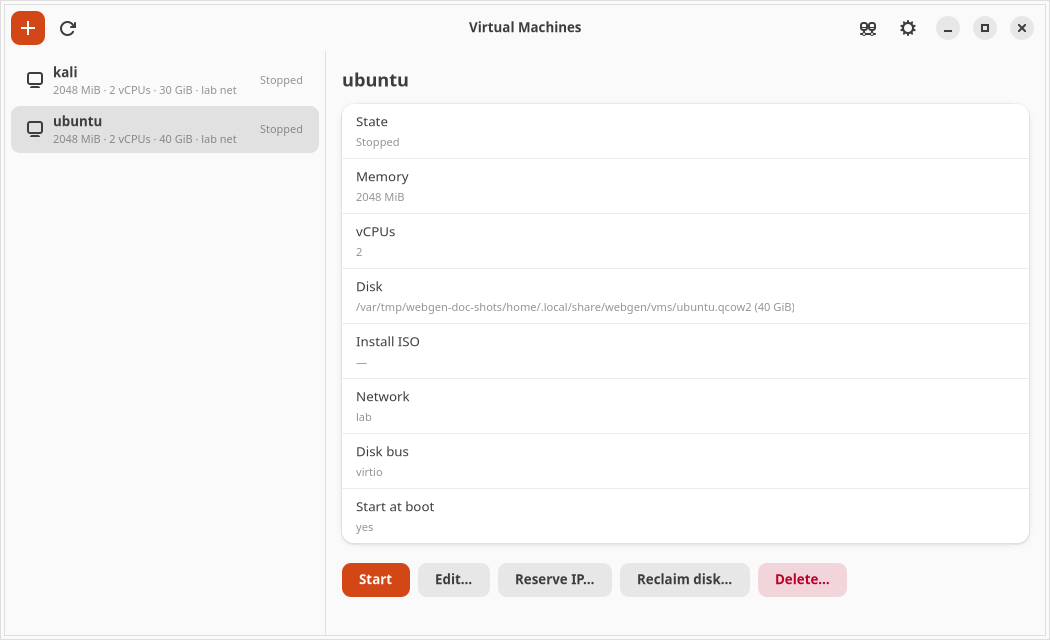
Every VM is a row on the left; selecting one fills the pane on the right with its settings and the actions that apply to it. Actions that would corrupt a running guest — editing it, reclaiming its disk, deleting it — are greyed out until it is shut down, and the tooltip says why rather than leaving you guessing.
Virtual networks
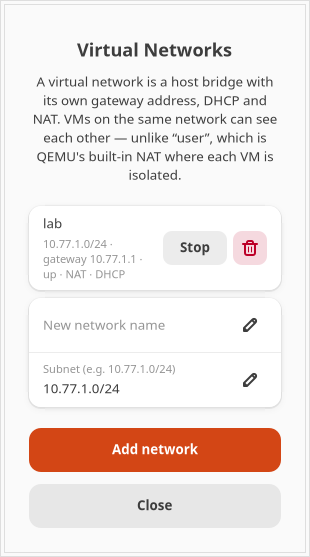
A VM can use NAT — QEMU's built-in networking, which needs no privileges and gives the guest internet access but keeps it invisible to everything else, including other VMs. Or it can join a NAT Network: a real host bridge with its own gateway address, DHCP and masquerade, where guests can see each other and share one gateway.
Create one in Virtual Machines → Networks (the icon in the header): type a name and a subnet, press Add network. Each VM has a list of network cards, so one guest can sit on several networks at once.
The same thing from a terminal:
sudo webgen-vmnet define lab --subnet 10.77.1.0/24
sudo webgen-vmnet up lab
Giving a guest a fixed address
Guests get their addresses from the network's DHCP server, and a lease can change. Anything that points at a guest by address — a port forward, an SSH shortcut, a bookmark — quietly breaks when it does. Pin the address instead:
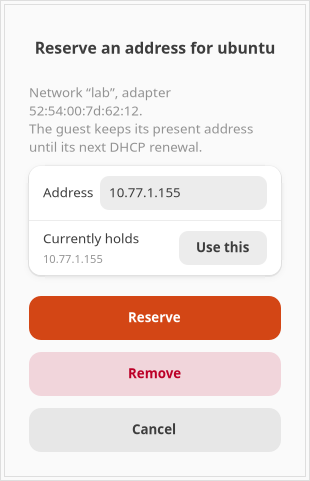
- Select the VM and press Reserve IP….
- The address it currently holds is offered as the default. Take it unless you have a reason not to — it is the only choice that cannot break a port forward already pointing at this guest.
- Press Reserve. The guest keeps its present address until its next DHCP renewal, so restart it if you want the change to take effect immediately.
Why reserve rather than set a static address inside the guest? Because a static address configured in the guest is invisible to the DHCP server. If it sits inside the pool, that address will eventually be handed to a second VM as well, and the resulting clash presents as an intermittent network fault rather than as the configuration mistake it is. A reservation tells the server the address is taken, and needs no configuration inside the guest at all — whatever operating system it runs.
sudo webgen-vmnet reserve add lab --mac 52:54:00:7d:62:12 --ip 10.77.1.155 --host ubuntu
sudo webgen-vmnet reserve list lab
sudo webgen-vmnet leases lab
Reclaiming disk space
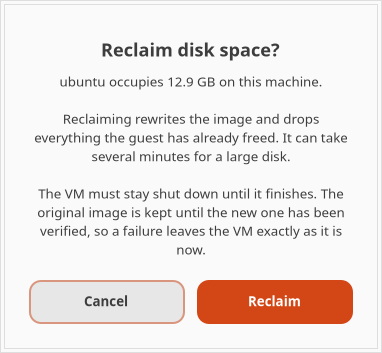
A disk image only grows. Deleting a file inside a guest frees a block in the guest; without help the host image stays exactly as large as it has ever been. WebGen tells QEMU to pass the guest's discards through to the image, so space now comes back as it is freed — run fstrim -a in the guest to hand it back on demand.
That does nothing about space already lost. To recover it:
- Shut the guest down. The action is unavailable while it runs, because rewriting the disk under a live guest destroys it.
- Select the VM and press Reclaim disk…. The dialog states what the image currently occupies.
- Press Reclaim and leave it. A large disk takes minutes.
Reaching a guest from another machine
Guests on a virtual network are not reachable from your LAN by default. Hand out the ports you want, one at a time:
sudo webgen-vmnet forward add lab --proto tcp --host-port 3000 --to 10.77.1.50:80
Or in Settings → Network → the network's bridge → Firewall. Forwards are stored with the network, so they survive a reboot, and the guest sees the real client address.
Starting guests with the machine
Tick Start at boot on a VM and it comes up with the host — before anyone logs in, so a headless box or a 3am reboot brings its guests back on its own. Guests start one at a time and are asked to shut down cleanly when the host does.
webgen-vm --list-autostart
webgen-vm --start ubuntu
An autostarted guest has no desktop session behind it, so reach its console over VNC or through a forwarded port.