Securing a WebGen machine
WebGen ships closed by default: inbound traffic is denied except SSH, no database or web server is running, and every optional daemon arrives stopped and disabled. This page is about the layer above that — knowing what state the machine is actually in, and changing it.
1 · What the panel does, and what it deliberately will not do
The Security panel reports posture and operates the tools. It does not author policy. That line is deliberate:
| It will | Start and stop rkhunter and fail2ban, enable them at boot, show their findings, read the live nftables ruleset, list who can become root, and flag accounts that can log in. |
|---|---|
| It will not | Rewrite /etc/sudoers, edit PAM, or change firewall rules.
A GUI that rewrites those is a GUI that can lock you out of your own machine, and the failure is
silent until the next login. |
Where a change is policy, the panel shows you the exact command instead of running it.
2 · The applications involved
| nftables | The firewall. WebGen ships no iptables at all. Inbound is denied by
default; the shipped ruleset opens tcp/22 and udp/5353 (mDNS, so .local names resolve),
accepts established traffic and loopback, and drops the rest. Ahead of all of that sits a sanity
block — ct state invalid plus the TCP flag combinations no real stack emits (no flags,
SYN+RST, SYN+FIN) — in both the input and forward chains; forward matters because that is
where guest traffic runs on a VM host. Starting a virtual network adds its own accepts for that
bridge, so a machine hosting VMs shows more rules than a bare one. Edit via
Settings → Network → Firewall, written to /etc/nftables.conf. |
|---|---|
fail2ban 1.1.0 | Watches auth logs and bans hosts that keep failing.
wgpkg install fail2ban. Ships inert — not started, not enabled, sshd jail off. |
| rkhunter | Rootkit and local-integrity scanner. In the base image, run nightly by cron. Its log is readable from the panel's Integrity tab. |
| AppArmor | Kernel MAC. apparmor_parser loads policy;
aa-status reports it. /etc/apparmor.d ships empty, so the LSM is inert
until you load a profile. |
| OpenSSH | Key-based login works out of the box. Password authentication is enabled by default — see below, it is the single most important thing to change. |
| webgen-vault | Session credential vault: SSH keys and passwords behind one unlock, with an ssh-agent socket. Starts locked. |
3 · Best practice, in the order that matters
Turn off SSH password authentication
This is the finding the panel puts first, and rightly. Anyone who can reach port 22 can guess passwords indefinitely. Install a key for every account that needs remote access, confirm you can log in with it, and only then:
sudo sed -i 's/^#*PasswordAuthentication .*/PasswordAuthentication no/' /etc/ssh/sshd_config
sudo rc-service sshd reloadTurn on brute-force protection
sudo wgpkg install fail2ban
sudo sed -i '/^\[sshd\]/,/^$/s/^enabled *=.*/enabled = true/' /etc/fail2ban/jail.local
sudo rc-update add fail2ban default && sudo rc-service fail2ban start
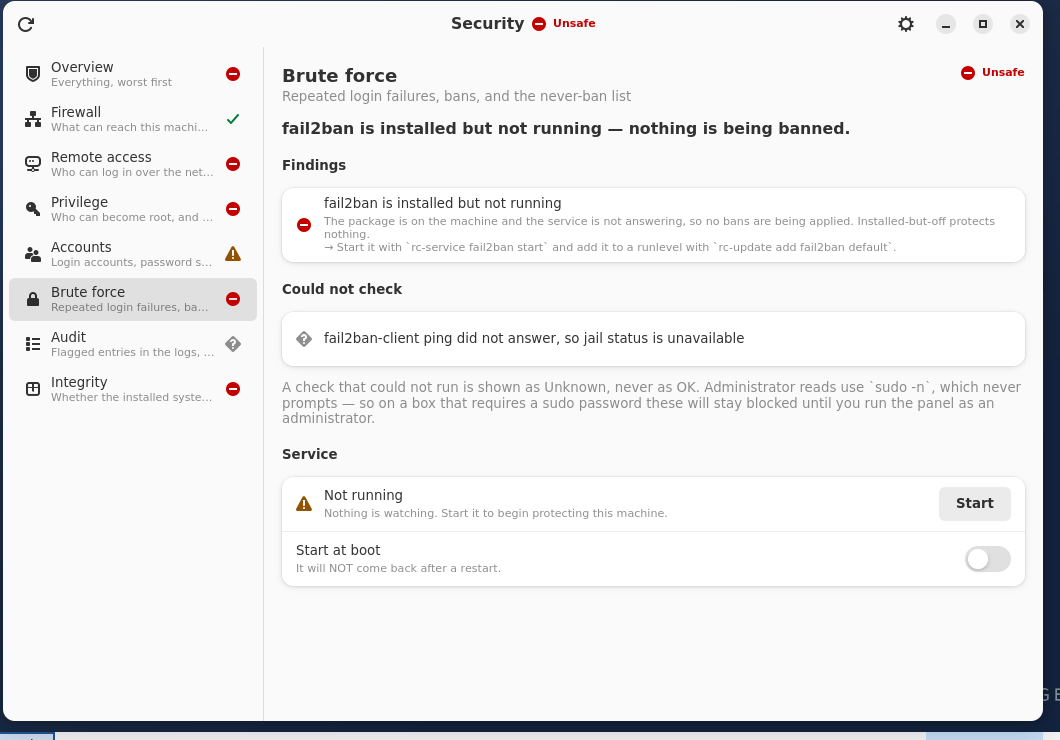
Or use Security → Brute force, which has Start and Start at boot controls. WebGen pins the nftables ban action; upstream's default is iptables, which does not exist here and would fail at the first ban rather than at start-up.
Understand what sudo actually allows
General sudo asks for a password and caches it for 15 minutes
(/etc/sudoers.d/10-wheel: %wheel ALL=(ALL:ALL) ALL). What is passwordless
is a deliberate, enumerated allow-list of individual commands in the other drop-ins — the
reads the Security panel needs (nft list ruleset, aa-status,
fail2ban-client status, the rkhunter log), suspend/reboot for the power menu, and the
specific helpers behind virtual networking and file sharing.
That is the property worth checking on a machine you inherit: not "can I sudo without a password"
but which commands are exempt, and whether any of them can be talked into running something
else. Read them with sudo cat /etc/sudoers.d/*.
This section used to say sudo was configured with no password prompt at all, so anything you ran was already root. That has not been true for some time — corrected 2026-08-11 after checking a running machine rather than the intent.
Keep the machine current
sudo wgpkg update && sudo wgpkg upgradePackage integrity is checked twice: the index carries a detached OpenPGP signature verified against a key baked into the image, and each package is checked against the sha256 in that signed index. A freshly installed machine also self-updates once on first boot.
4 · Reading the panel
Each area reports one of four states. Unknown is never treated as OK — a check that could
not run says so. Privileged reads use sudo -n, which never prompts; they work without
one because those exact commands are on the passwordless allow-list in
/etc/sudoers.d/20-security-reads. If that file is missing or has been edited, the
checks it covers go Unknown rather than wrong — which is the intended failure, but it does mean
a run of Unknowns is worth investigating as a sudoers problem, not dismissed as "the panel
needs admin".
| Firewall | The live nftables ruleset, not the file — so a rule added by hand is seen. |
|---|---|
| Remote access | sshd's effective config: port, root login, password auth. |
| Privilege | Who can become root, and whether it costs a password. |
| Accounts | Which accounts can actually log in, and whether password strength is enforced. |
| Brute force | fail2ban: installed, running, jails, and who is currently banned. |
| Audit | Flagged entries in the auth log. Needs a readable auth log — syslog-ng ships stopped. |
| Integrity | Whether installed packages still match what was shipped, plus rkhunter's last scan. |
5 · What WebGen does not have
Stated plainly, because a security page that implies more than exists is worse than none:
- No auditd, no AIDE. There is no kernel audit trail and no file-integrity baseline beyond rkhunter and wgpkg's own package verification.
- No AppArmor profiles. The tooling is present and
/etc/apparmor.dis empty, so the LSM enforces nothing until you write policy. - No polkit. Privileged GUI actions use
sudo -n; on a machine with passwordless sudo that means they are not authenticated at all. - Password auth is on by default. See section 3.