Running a file server
Serve one directory to every machine in the building. This guide turns a WebGen box into a file server that macOS, Windows and Linux can all find by name and connect to with a password — using the SMB server built into the kernel, with no Samba anywhere.
1 · What does the serving
| SMB / CIFS | ksmbd-tools 3.5.6 — userland for the
kernel’s own SMB3 server. Not Samba: the kernel does the serving and only a small
helper runs in userspace. SMB 2.1/3.0/3.1.1 only — no SMB1, which is a feature. |
|---|---|
| NFS | nfs-utils 2.8.7 — NFSv4 only. One port (2049),
no rpcbind, no statd. Optional, and read the warning in step 5 before you enable it. |
| Discovery (Mac/Linux) | avahi 0.8 — mDNS. Publishes
the machine as <name>.local and advertises the share to Finder. |
| Discovery (Windows) | wsdd 0.9 — WS-Discovery.
The only way modern Windows finds a server: Windows 10 dropped SMB1 and NetBIOS browsing with it. |
sudo wgpkg update
sudo wgpkg install ksmbd-tools
sudo wgpkg install avahi
sudo wgpkg install wsdd
2 · Where the share lives
/ on every reinstall and preserves the webgen-home partition. Put a
share in /srv on a machine you ever reinstall and the data loss is not a risk, it is
scheduled.Put it under /home, which survives:
findmnt -no SOURCE --target /home     # confirm this is the webgen-home partition
sudo install -d -m 2775 /home/share
The 2 is setgid: every file created inside inherits the directory’s
group, whichever protocol wrote it. Without it, files land in the creator’s primary group and
the two protocols disagree about who owns what.
3 · A group for the share — not wheel
%wheel ALL=(ALL:ALL) ALL. On WebGen, wheel is root.
Adding a file-share user to it hands them the machine. Make a group that grants exactly one thing:
write access to the share.sudo groupadd -r sharedfiles
sudo chgrp -R sharedfiles /home/share
sudo chmod 2775 /home/share
sudo usermod -a -G sharedfiles alice4 · SMB: users, then the share
SMB authentication is separate from Unix accounts, but file ownership is not. Three things must agree, and it is worth knowing which does what:
| Unix account | Gives files an owner. Without one, everything that user writes
lands as uid 65535 (nobody) — quotas and “who wrote this” stop meaning
anything. The password is unrelated to the SMB one. |
|---|---|
| SMB password | ksmbd.adduser writes to /etc/ksmbd/ksmbdpwd.db.
This is what the client authenticates against. It works with no Unix account at all — the
login succeeds, only the ownership is wrong. |
valid users | The share’s own guest list. A user in the database with the right password is still refused if they are not named here. |
sudo useradd -m -G sharedfiles alice   # Unix identity (ownership)
sudo ksmbd.adduser -a alice            # SMB password (prompts twice)
Or from System Settings → Sharing, which is usually easier and is the only place that can back the accounts up. Add and remove users, reset a forgotten password, and export the whole set to a file:
sudo webgen-share users list
sudo webgen-share users export ~/smb-users.db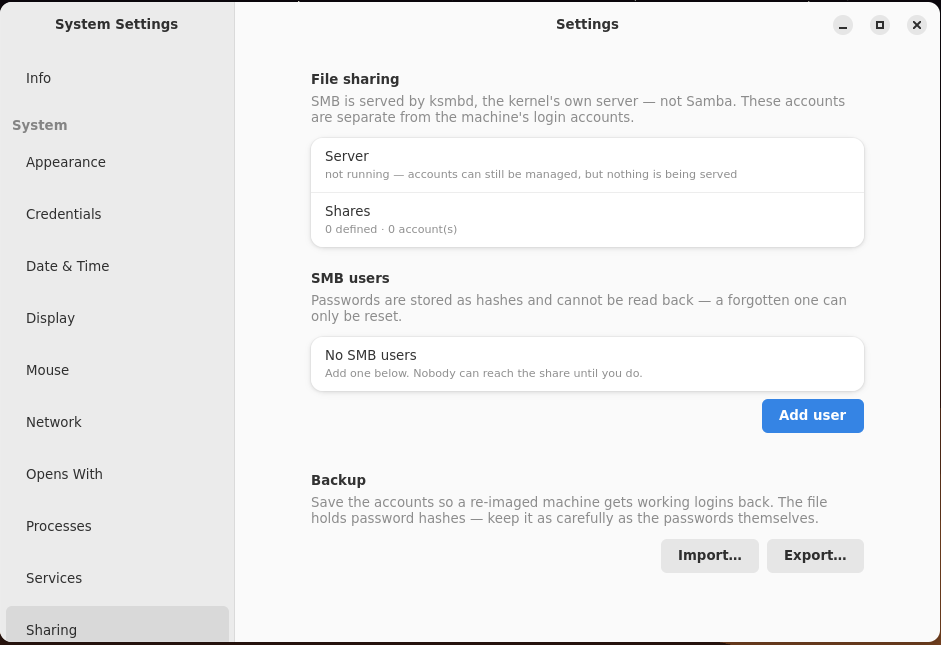
webgen-share, the command above, and shows you the result. So the
pane is the discoverable face and the CLI is the scriptable one, and neither can drift from the
other: a user you add here appears in webgen-share users list, and one you add in a
script appears here on the next open. That is the pattern across WebGen — the GUI never grows
its own copy of the logic.This is also why the pane is honest about a stopped server rather than hiding it. The state above
is a fresh machine: ksmbd installed, nothing served, no accounts — exactly where step 1 leaves
you, and exactly what webgen-share status reports from a terminal.
That export exists for one reason: SMB passwords are stored as hashes and cannot be read back, so re-imaging a machine loses every share login unless they were copied first. Importing the file on the new install restores working logins without anyone having to remember what they were. Guard the file as carefully as the passwords — it contains the hashes.
Settings also flags the mistake that is hardest to diagnose from a client: a user that exists in
the password database but is not named in any share’s valid users. From the other
end that looks exactly like a wrong password.
Then /etc/ksmbd/ksmbd.conf:
[global]
	workgroup = WORKGROUP
	netbios name = TV
	server min protocol = SMB2_10
	map to guest = never
	restrict anonymous = 2
	smb3 encryption = auto
	server signing = mandatory

[share]
	path = /home/share
	read only = no
	valid users = alice
	create mask = 0664
	directory mask = 0775
	force group = sharedfiles
smb3 encryption takes disabled, auto or
mandatory — not yes, which is silently ignored and leaves you
believing the wire is encrypted when it is not. auto encrypts when the client asks
(-o seal); mandatory refuses clients that cannot.
sudo rc-update add ksmbd default
sudo rc-service ksmbd start
5 · NFS — optional, and read this first
macOS and Windows both speak SMB natively, so for a mixed network NFS buys you nothing. Add it only for Unix hosts you already trust, and name them individually:
# /etc/exports -- named hosts, never a whole subnet
/home/share  192.168.1.170(rw,sync,no_subtree_check,fsid=0,all_squash,anonuid=1000,anongid=3000)
fsid=0 marks the NFSv4 pseudo-root, so clients mount server:/ rather
than the server-side path — which means moving the directory later needs no client changes.
Naming hosts is host-level trust, not user authentication: it is a large reduction in
exposure, not a fix. The real answer is SMB only, or NFSv4 with Kerberos.
sudo exportfs -ra
sudo rc-update add nfs-server default
sudo rc-service nfs-server start
6 · Being findable
Without this the share exists only if you already know the IP — and that IP moves with the
DHCP lease. avahi gives the machine a stable <name>.local that
follows it.
sudo rc-update add avahi default && sudo rc-service avahi start
sudo rc-update add wsdd  default && sudo rc-service wsdd  start
avahi-browse -at | grep _smb      # confirm the share is advertised
Installing ksmbd-tools also drops /etc/avahi/services/smb.service, the
advert Finder looks for. If the share never appears, check /var/log/messages for
XML_ParseBuffer() failed — avahi ignores a malformed service file and carries on,
so the only symptom is silence.
7 · Firewall
Every port below is scoped to the LAN. Add to /etc/nftables.conf inside the
input chain:
ip saddr 192.168.1.0/24 tcp dport 445  accept   # SMB
ip saddr 192.168.1.0/24 tcp dport 2049 accept   # NFSv4 (only if you enabled it)
ip saddr 192.168.1.0/24 udp dport 5353 accept   # mDNS
ip saddr 192.168.1.0/24 udp dport 3702 accept   # WS-Discovery
ip saddr 192.168.1.0/24 tcp dport 5357 accept   # WS-Discovery metadata
sudo nft -c -f /etc/nftables.conf # validate BEFORE loading
sudo rc-service firewall restart8 · Connecting — macOS
The server should appear in Finder’s Shared sidebar by name. If it does not, connect directly with ⌘K:
smb://tv.local/shareUse the SMB username and password from step 4 — not the machine’s login. Tick Remember this password in my keychain to make it stick. To mount at login: System Settings → General → Login Items, add the mounted volume.
9 · Connecting — Windows
With wsdd running the machine appears under Network in Explorer. Otherwise
type the path into the address bar:
\\tv\shareTo keep it across reboots, map a drive — in Explorer, This PC → Map network drive, tick Reconnect at sign-in and Connect using different credentials; or from a command prompt:
net use Z: \\tv\share /user:alice /persistent:yesIf Windows refuses with a protocol error, it is almost always looking for SMB1. It is not available here and should not be enabled — it is the protocol behind WannaCry.
10 · Connecting — Linux and WebGen
In Files, use Connect to Server and pick SMB / CIFS. The
Share name field wants the share’s name (share), not the
server’s directory path — typing /home/share there is the commonest way to
get a mount error that explains nothing. The password is kept in
webgen-vault, never in the file manager’s settings.
To mount it at boot instead, put the credentials in a root-only file —
/etc/fstab is world-readable, so a password on that line is readable by every local
user:
sudo install -m 0600 /dev/null /etc/cifs-credentials
sudo tee /etc/cifs-credentials <<'EOF'
username=alice
password=your-smb-password
EOF
# /etc/fstab
//tv.local/share /mnt/share cifs credentials=/etc/cifs-credentials,vers=3.1.1,_netdev,nofail,uid=1000,gid=3000,iocharset=utf8,file_mode=0664,dir_mode=0775 0 0WebGen mounts these with webgen-netmount, which waits for the network to actually
work rather than merely for the network script to have run. Systemd distributions should add
noauto,x-systemd.automount instead, so the share mounts on first access and a machine
away from this network never delays boot.
For NFS on a host you exported to:
//  NFS uses the pseudo-root, not the server-side path
tv.local:/  /mnt/share-nfs  nfs4  _netdev,soft,timeo=50,retrans=2  0 0
soft makes I/O fail after about ten seconds when the server disappears instead of
hanging a process forever. Right for a convenience share; use hard where a torn write
would matter. Note nofail is not used on the NFS line: libmount passes it
through to mount.nfs4, which rejects it, and the entry then never mounts at all.
Troubleshooting
| Permission denied on mount | Three gates: the user is in ksmbdpwd.db
(sudo ksmbd.adduser -a name), named in valid users, and has a Unix
account. All three must agree. |
|---|---|
| Files owned by 65535 | The SMB user has no matching Unix account. Create one with the same name. |
| Server not in Finder / Network | avahi and wsdd running?
Firewall open on 5353/udp and 3702/udp? avahi-browse -at | grep _smb tells you whether
the advert is live. |
.local will not resolve on Linux | Linux needs nss-mdns to
resolve .local; macOS and Windows do it natively. Use the IP, or install it. |
| Group has no write access | Directories made over NFS take the client’s umask
and come out 2755. Fix with find /home/share -type d -exec chmod 2775 {} +. |
| Mount point looks empty but has files | Something wrote into the directory while nothing was mounted; the real mount now hides it. Unmount and check the bare directory. |