AI & Critical Points of Failure in Business

A few days ago I was asked to chime in on the reliability of (software) vendors when making purchasing decisions. This leads to two main areas of thought (I’m ignoring cost because if you cannot afford the solution then you are out of that market so it is not a choice that you are able to make). These are:
- What is reliability in terms of software vendors?
- What is the risk analysis involved in making a sound decision?
Here is a quick comparison to vendors by size – somewhat historical but this is just background not the core of this article.
| Large Vendor | Small Vendor | |
| Development Staff | > 100 | < 15 |
| Pricing | Dominant / Setting | Responsive / Reactive |
| Documentation | Voluminous | Sparse |
| Training | Self help and paid versions, a product line in itself | Available, usually part of the set up cost |
| Feature Set | Seemingly Complete, Industry Standard | Core + bleeding edge |
| Help | Extensive, good luck talking to a human without a SLA and your customer number handy | You probably can call the CTO whilst they are on their lunch break |
| New Features | Profit Driven | Customer Driven |
| Backwards Compatibility | Profit Driven, get to new markets first | Customer Driven, cannot afford to lose existing customers |
| Uptime | Industry Standard | Industry Standard |
| Skills in the candidate pool | Abundant | Limited |
| Critical point of failure | You become outside their target market, forgotten, discarded | The organisational knowledge ends – loss of key/specialist employees, unrecoverable financial downturn |
So looking at reliability we run into a few different definitions or factors that come into things. If a large vendor like Microsoft has a UI for MS Word for decades that has “File” over there which drops down with things like “Print” and “Page Set-up” on it and it is a sure thing right that like Apple Mac, that is where it will live forever?
Wrong!
A few years ago they came out with this big, chunking I’m-not-a-toolbar-but-my-Mother-was “idea” of how we get to point and click to make some change that we have been doing since the last millennia into something of a hide-and-seek that made you lust of re-becoming an agrarian society once more.
OK you might get a tone that I wasn’t a fan. You also might not realize that back in the day there was “Notepad” and “Wordpad”. Wordpad was a version of MS Word version 6 that they wrapped in for free once they had a new version out (that you had to buy). Also there are alternatives be those Open Office for your PC or cloud offerings.
Does this sort of change pass the vendor reliability test? Does your business have to pay either time, training costs or both to re-skill your staff? Who is working while these team members are off training? Do you stagger upgrades so does that have any political issues as to who gets the new toys first or are their compatibility issues as documents move between departments?
This is a brief overview but gives you a starting point of your risk analysis in regards to reliability with respect to large vendors.
With respect to small vendors the explanation is far simpler:
- They generally cannot afford to lose you as a customer
- They will make changes as urgently as practical to meet customer feedback whilst maintaining current relationships
- If the lead software designer is removed (retires, has a tragic ending, moves away, etc) then the vendor is going to become dormant for a period or in extreme cases cease at somepoint.
RE: Small Vendors – don’t complain; their customers: don’t panic: Every business has plans and capabilities to absorb and re-group. It rarely happens in the blink of an eye. Often the worst case is making a few changes and having the current versions ticking over “as is” for 3-6 months before moving forward with their development road-map. Sometimes you will never know that there was an issue in the first place.
Summary of the Background
- Large Vendors: More expensive, they can and will change things “just ‘cos” and you will have to deal with it. This is unreliable from a vendor but you have a greater degree of certainty that support for changes will be there, perhaps even if they are only available at cost.
- Small Vendors: Cost competitive but potentially different feature sets in the application. Difficult for them to absorb external and internal change without a dip in reliability to some degree.
AI & Vendors ~ Small vs Big & Composition vs Output
One of the niches that is getting better by the day is using AI for software development. This is because software and engineering in general relies on bodies of work, patterns, examples and documentation that came before. The knowledge is right there already.
Couple that with the fact that many, many, many developers are wanting something specific and almost identical.
We don’t ask for this (prompt):
- HTML for sign up form
We ask for this (prompt):
- Bootstrap 5 / JQuery compatible, mobile responsive signup form. Date controls must use JQ popups and not browser based ones. Target market is the US. Required: first, last, email, phone, country, dob. Add industry standard password complexities. Must be one page using CDN
This is what you get:
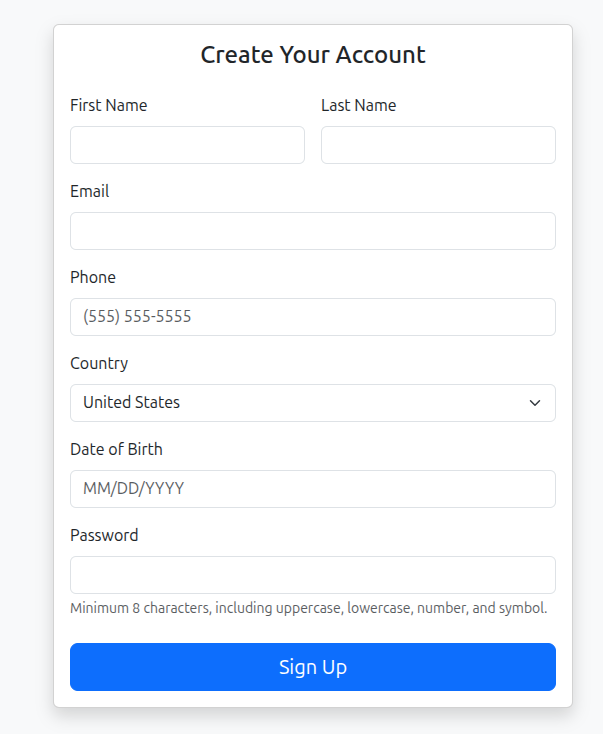
<!DOCTYPE html>
<html lang="en">
<head>
  <meta charset="UTF-8">
  <title>Signup Form</title>
  <meta name="viewport" content="width=device-width, initial-scale=1">

  <!-- Bootstrap 5 CSS -->
  <link
    href="https://cdn.jsdelivr.net/npm/bootstrap@5.3.2/dist/css/bootstrap.min.css"
    rel="stylesheet">

  <!-- jQuery UI CSS -->
  <link
    rel="stylesheet"
    href="https://code.jquery.com/ui/1.13.2/themes/base/jquery-ui.css">

  <style>
    body {
      background-color: #f8f9fa;
    }
    .signup-card {
      max-width: 520px;
      margin: 2rem auto;
    }
    .ui-datepicker {
      font-size: 0.9rem;
    }
  </style>
</head>
<body>

<div class="container">
  <div class="card shadow signup-card">
    <div class="card-body">
      <h4 class="card-title text-center mb-4">Create Your Account</h4>

      <form id="signupForm" novalidate>

        <div class="row g-3">
          <div class="col-md-6">
            <label class="form-label">First Name</label>
            <input type="text" class="form-control" required>
          </div>

          <div class="col-md-6">
            <label class="form-label">Last Name</label>
            <input type="text" class="form-control" required>
          </div>

          <div class="col-12">
            <label class="form-label">Email</label>
            <input type="email" class="form-control" required>
          </div>

          <div class="col-12">
            <label class="form-label">Phone</label>
            <input
              type="tel"
              class="form-control"
              placeholder="(555) 555-5555"
              pattern="^\(?([0-9]{3})\)?[-.●\s]?([0-9]{3})[-.●\s]?([0-9]{4})$"
              required>
          </div>

          <div class="col-12">
            <label class="form-label">Country</label>
            <select class="form-select" required>
              <option value="">Select Country</option>
              <option value="US" selected>United States</option>
              <option value="CA">Canada</option>
              <option value="MX">Mexico</option>
            </select>
          </div>

          <div class="col-12">
            <label class="form-label">Date of Birth</label>
            <input
              type="text"
              id="dob"
              class="form-control"
              placeholder="MM/DD/YYYY"
              autocomplete="off"
              required>
          </div>

          <div class="col-12">
            <label class="form-label">Password</label>
            <input
              type="password"
              class="form-control"
              id="password"
              required
              pattern="(?=.*[a-z])(?=.*[A-Z])(?=.*\d)(?=.*[^A-Za-z0-9]).{8,}">
            <div class="form-text">
              Minimum 8 characters, including uppercase, lowercase, number, and symbol.
            </div>
          </div>
        </div>

        <div class="d-grid mt-4">
          <button type="submit" class="btn btn-primary btn-lg">
            Sign Up
          </button>
        </div>

      </form>
    </div>
  </div>
</div>

<!-- jQuery -->
<script src="https://code.jquery.com/jquery-3.7.1.min.js"></script>

<!-- jQuery UI -->
<script src="https://code.jquery.com/ui/1.13.2/jquery-ui.min.js"></script>

<!-- Bootstrap 5 JS -->
<script src="https://cdn.jsdelivr.net/npm/bootstrap@5.3.2/dist/js/bootstrap.bundle.min.js"></script>

<script>
  $(function () {
    $("#dob").datepicker({
      changeMonth: true,
      changeYear: true,
      yearRange: "1900:+0",
      maxDate: 0,
      dateFormat: "mm/dd/yy"
    });

    $("#signupForm").on("submit", function (e) {
      if (!this.checkValidity()) {
        e.preventDefault();
        e.stopPropagation();
      }
      $(this).addClass("was-validated");
    });
  });
</script>

</body>
</html>
Note: It took me far longer to type up the words above, screenshot, copy code etc; than it did to have 50% of a working sign up form implemented. This was done in real time to demonstrate how easy software development is wedded to AI and this relationship is only growing more and more.
So they use AI – so what?
In my current work I use AI to prototype things I really do not want to type or commit to memory because I use them infrequently. My process is write a prompt to get a specific collection of code, perhaps a few revisions and then go back with specific fixes that make it work either by re-questioning/pointing out changes or making changes manually.
The use of AI is not innovative. It is a tool that speeds up a process and requires less human resources to achieve the same software projects.
If you think that AI can in it’s current form write the best software in the world solo then answer this: If you owned that AI would you a) Sell subscriptions to the masses so everyone can have the best software of their own or b) Use it to write and own the best software and sell them subscriptions to it for the rest of their lives?
Riiiiight….
AI == Less People
This is the crux of the proposition:
- A vendor can use AI to automate tests, write documentation (no one reads it anyway), create effective industry standard boilerplate UI/UX, write classes, models, controllers, libraries, API’s clients, servers, etc.
- Even one chunk of that would make 10% of the development team redundant.
- The example uses some of many aspects of software development, there are well beyond 10.
- The large vendor can cut their development team from 100 down to 20, the small one from 10 to 2.
- At this point we see the risk profile that the small vendor suffered from – a critical point of failure when the key software person is removed – is now close to identical to the large vendor – 20 people don’t remember what the other 80 laid off workers did.
Wrapping it Up
The further integration of AI into software vendors is raising the potential of a tendency for large vendors to the composition of a smaller vendor. The difference being top heavy management but sharing the scarcity of technical depth which ushers in a difference in risk profile for the large vendors.
Their points of difference about stability and reliability are now trending towards a business structure that does not represent the culture and practices that they are familiar with, respond well to and finally does not back up their key buying arguments.
“We are the same big ship but smaller at the bottom but still the same at the top. Can we still have your money tho?”
There are huge changes ahead. Expect more and more non-developer Exec’s to use AI to build their software visions and hand them off to dwindling numbers of real Developers. Is it sustainable? Is there a new vision where the lines between large vendors and small ones becomes meaningless. Which would you pick? Why? Knowing that the smaller vendors will build it to your specifications that map your specific business needs is that more compelling now knowing that the people supporting your business know software and built careers around it rather than a middle management type who has learned to use AI tools solely?







Related Posts